If you already work in Unity, its Web build is a real option for browser games: one project, a WebAssembly build, and support for desktop browsers, iOS Safari 15 and later, and Chrome on Android. Unreal is different. Epic removed HTML5 from the engine years ago, and Unreal Engine 5 has no browser export from Epic. For a game that lives mainly on web pages and game portals, a JavaScript HTML5 engine such as Phaser, Three.js, Babylon.js or PlayCanvas usually wins on download size, start-up time and how easily it fits into a page.
We build our games for the browser first: 41 on Phaser 4 and 9 on Three.js, with initial downloads of 300 to 750 KB. This guide compares that route with Unity and Unreal honestly, including when Unity is the better choice. Facts were checked against Unity's and Epic's documentation on 25 October 2026 (Unity 6.6 and Unreal Engine 5.8). For the full list of browser engines, see our comparison of HTML5 game engines.
HTML5 game engine vs Unity WebGL vs Unreal at a glance
| Unity (Web platform) | Unreal Engine | JavaScript engines (Phaser, Three.js, Babylon.js, PlayCanvas) | |
|---|---|---|---|
| Browser export from the vendor | Yes, WebAssembly + WebGL 2, optional WebGPU | No (removed in 4.24) | The engine is JavaScript already |
| How it runs | Engine runtime compiled to WebAssembly, plus your data | Pixel Streaming (video from a server) or unofficial ports | Native browser code, loaded like any script |
| Download before play | Engine runtime plus assets; larger even for small games | Stream: none, but a GPU server per session | Library plus assets; our games load 300 to 750 KB first |
| Mobile browsers | iOS Safari 15+, Chrome 58+ on Android | Stream only | Yes |
| Language | C# | C++ and Blueprints | JavaScript or TypeScript |
| Editor | Full desktop editor | Full desktop editor | Code first; PlayCanvas has a browser editor |
| Cost | Free Personal plan under a revenue and funding limit, Pro above it | Free, with a 5% royalty on lifetime revenue above $1 million per product | Open source (MIT for Phaser, Three.js and the PlayCanvas engine; Apache 2.0 for Babylon.js) |
Sources: Unity's browser compatibility page and Personal plan, Epic's licence terms, and each engine's repository. Licence terms change, so check them before you commit.
Unity for HTML5 games: how the Web build works
Unity calls its browser target "Web" (it was "WebGL" for years, and most people still search for Unity WebGL). The build compiles your C# and the engine to WebAssembly and renders with WebGL 2 by default. Unity 6.6 also offers WebGPU as an alternative graphics API, which you enable in the Web player settings; WebGL 2 stays the default because more devices support it.
The Web platform has limits that catch C# developers out. Unity's technical overview lists the main ones: no managed C# threads, no System.Net sockets (browsers forbid raw sockets), and an audio back end with only basic features. Networking goes through UnityWebRequest or WebSockets instead.
How to convert a Unity3D game to HTML5
- In Unity Hub, add the Web Build Support module to your editor version.
- Open File > Build Profiles, select Web and switch platform. Expect re-imports on a big project.
- In Player Settings, choose a compression method (gzip by default, Brotli for smaller files over HTTPS) and a Web template for the page around your game.
- Build. Unity writes a
Buildfolder with a.loader.js,.framework.js,.wasmand.datafile, plus anindex.htmlfrom the template. - Test through a local web server, not by double-clicking
index.html; browsers block local file access (build folder reference).
Then the real work starts: cutting texture sizes, removing unused packages, and testing on phones. A desktop game rarely runs well in a mobile browser without changes to rendering and memory use.
How to put a Unity3D game into an HTML5 page
You can upload the whole build folder and link to its index.html, or embed that page in an <iframe> on your site. The server has to cooperate: Unity's deployment guide says compressed files need a matching Content-Encoding header (gzip or br) and .wasm files need Content-Type: application/wasm so the browser can compile while downloading. If you can't change server headers (some shared hosts and portals), enable Decompression Fallback, which unpacks files in JavaScript at the cost of slower loading.
To talk between the page and the game, Unity uses two mechanisms. From C# to JavaScript, you write a .jslib plug-in and import its functions with [DllImport("__Internal")]. From the page to C#, you call SendMessage on the Unity instance:
// After createUnityInstance(...) resolves with unityInstance:
unityInstance.SendMessage("GameManager", "SetPlayerName", "Sam");
The first argument is a GameObject name, the second a public method on one of its scripts, and the third an optional string or number. Our guide to embedding an HTML5 game in a website covers iframes, sizing and mobile layout for any engine.
How to play Unity HTML5 games
Open the page in a current browser; nothing needs installing. The old Unity Web Player plugin stopped working when browsers dropped plugin support, so any page still asking for it is abandoned. If a Unity game won't start, the browser probably lacks WebGL 2, the device is short of memory (common on older phones), or the server sends the wrong headers. Our guide to playing HTML5 games has general fixes.
Unity 3D HTML5 games and demos
Unity Play hosts web builds that creators upload as a ZIP, and Unity's own learning tutorials end with publishing a microgame there. It's the quickest way to see what Unity 3D looks like in your own browser and on your phone before you decide.
Vuforia and AR: can you build a Vuforia game to HTML5?
No. Vuforia Engine targets Android, iOS and Windows (supported versions), and a Unity project that uses it won't build for the Web platform. For augmented reality in a browser you need web-native tools: the WebXR Device API for AR sessions where browsers support it (Chrome on Android), or image tracking libraries that run on the camera feed in JavaScript. One option changed in 2026: Niantic Spatial shut down 8th Wall's hosted platform on 28 February 2026 and released the framework as open source, without its SLAM module.
Can I make an HTML5 game in Unreal?
Not with Epic's current engine. Unreal Engine 4 had an HTML5 platform built on Emscripten, which compiled the engine's C++ to WebAssembly and JavaScript. Epic deprecated it, and from 4.24 moved it out of the engine into a community-maintained platform extension. The extension's documentation says you get access only after linking your Epic Games and GitHub accounts, and its published branch targets 4.24.3. Unreal Engine 5, including 5.8, has no web export from Epic.
Unreal Engine 4 HTML5 games and community forks
Searches for "UE 4.21 intermediate build HTML5 Emscripten" come from that era: in versions such as 4.21 to 4.23 you packaged for HTML5, and the engine ran an Emscripten build that produced the game's .html, .js, .wasm and .data files. Since Epic stepped back, a few individuals have kept forks alive, for example a 4.27 fork with WebGL 2 shaders. Their own notes set the limits: no multithreading, desktop browsers only in the author's testing, and anything that didn't work in Epic's last HTML5 version probably won't work now. They're fine for experiments and archives, risky for a commercial game.
For Unreal Engine 5 there are two routes, neither of them an HTML5 export:
- Pixel Streaming (official): the game runs on a machine with a GPU and streams video to the browser over WebRTC; input goes back the other way (overview). Players download almost nothing, but you pay for a GPU server per concurrent player, and quality depends on their connection.
- Third-party WebGPU ports, such as Wonder Interactive's SimplyStream SDK, which compile UE5 projects to WebAssembly and WebGPU. These are commercial products outside Epic's support; check their current status and terms directly.
How to deploy an Unreal game to a website
For an old 4.23 HTML5 build or a fork, the deployment rules are the same as for any WebAssembly game: upload every packaged file, serve compressed files with the right Content-Encoding and .wasm files as application/wasm, and embed the page with an <iframe>. Plan for long first loads, because the engine runtime and cooked content are large.
For Pixel Streaming, the "game on your website" is Epic's player page connected to your streaming server, which you can restyle and embed like any web page.
Passing messages between the browser and an Unreal game
With Pixel Streaming, the player page sends custom JSON messages to the game (the front-end library's emitUIInteraction), and a Pixel Streaming Input component in your level receives them through its OnInputEvent. The game answers with SendPixelStreamingResponse. In the old HTML5 builds, you called between JavaScript and C++ through Emscripten's interop functions instead.
Optimizing an Unreal game for HTML5
If you do try a fork, design for the web from the start: small levels, mobile-class rendering features, compressed textures, aggressive asset stripping, and no reliance on threads. In practice, teams that need a large Unreal game in a browser choose Pixel Streaming, and teams that need a small, fast web game choose a web engine.
Unity vs HTML5 for a 3D game
Choose Unity when:
- You already have a Unity game and want a browser version for demos, jams or a portal that accepts Unity builds.
- The game needs Unity's tools: animation, physics, terrain, the asset store, and an editor your team knows.
- The web is one platform among several, and desktop or mobile apps are the main target.
Choose a JavaScript 3D engine such as Three.js, Babylon.js or PlayCanvas when:
- The game lives on web pages, portals or in ads, where a slow first load loses players.
- It must start on mid-range phones and sit inside a page, talk to the page's JavaScript, or load a portal SDK.
- You want to debug the code you wrote in the browser, with no engine runtime in between.
Our nine Three.js games show what the second route looks like in practice: initial downloads of 300 to 382 KB, touch, mouse, keyboard and gamepad input, and portrait or landscape layouts. Drift District adds the Rapier physics engine for its cars. You can play Three.js games with source code in your browser, and our guide to 3D HTML5 games compares the 3D engines in more depth.

Drift District
Drift compact urban circuits, chain slides and earn reputation through style and speed.
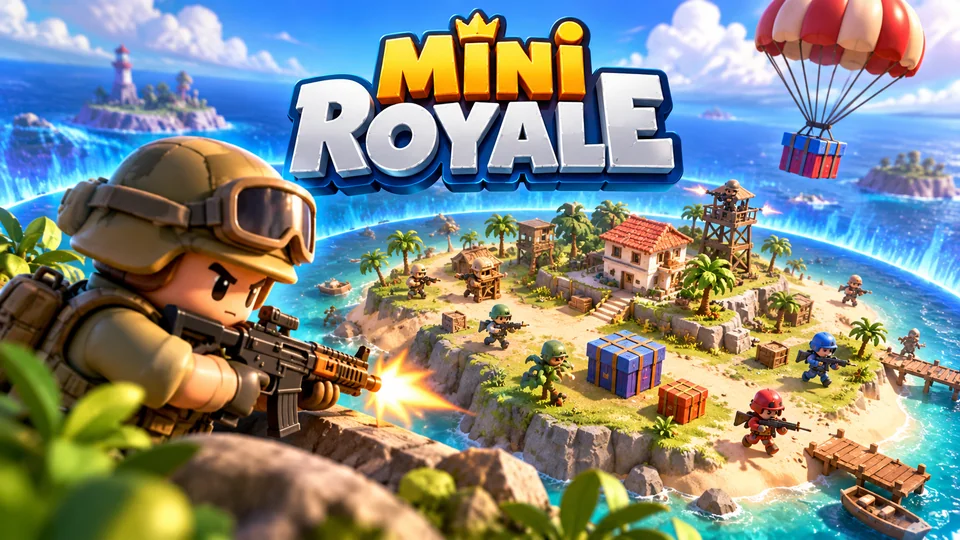
Mini Royale
Sixteen toy fighters drop onto a tiny island, grab simple gear and survive as the safe zone rapidly contracts.

Glass Shelf Triple
Select three identical objects from a layered display cabinet; clearing front objects reveals deeper layers.
For 2D games the gap is bigger still. A 2D game in Phaser doesn't need a 3D engine's runtime at all, which is why our 41 Phaser 4 games load in well under a megabyte. If you're coming from GameMaker rather than Unity, our GameMaker HTML5 guide covers its two web exports, and our guide to making HTML5 games in other languages covers C#, C++ and Python routes into the browser.
How to choose in five questions
- Is the browser the main platform? If yes, start with a JavaScript engine. If it's a demo of a desktop or console game, use that game's engine.
- Do players arrive from a link, a portal or an ad? Then first-load size matters more than features. Measure it on a mid-range phone over mobile data.
- Is it 2D? Then a 3D engine's runtime is weight you don't need.
- Is it already built in Unity? A Web build is cheaper than a rewrite. Optimize it and test on phones.
- Is it Unreal? Use Pixel Streaming for a browser demo, or rebuild the game for the web if it needs to load fast and run on phones.
Frequently asked questions
Is Unity WebGL the same as HTML5?
Close enough for players. A Unity Web build is an HTML page that loads a WebAssembly build of the Unity engine and renders with WebGL, all standard browser technology with no plugin. The difference for developers is that the engine runtime is downloaded with every game, so builds start larger than games written in JavaScript.
Do Unity web games work on phones?
Unity supports iOS Safari 15 and later and Chrome on Android for its Web platform. Whether your game runs well is another matter: memory limits and GPU power on phones are much lower than on desktops, so test on real mid-range devices and cut texture and mesh sizes for the web build.
Can I make an HTML5 game in Unreal Engine 5?
Not with an export from Epic. Your options are Pixel Streaming, which streams the game from a server, or a commercial third-party port. If you need a small game that loads fast on phones, rebuild it with a web engine.
Which is better for a browser game, Unity or Phaser?
For a 2D game made for the web, Phaser: it is smaller, starts faster and runs inside the page without a separate runtime. For a 3D game you've already built in Unity, or a project shipping on several platforms, Unity's Web build can be the better trade.
We make and sell HTML5 game source code; links to our games are marked as ours.